
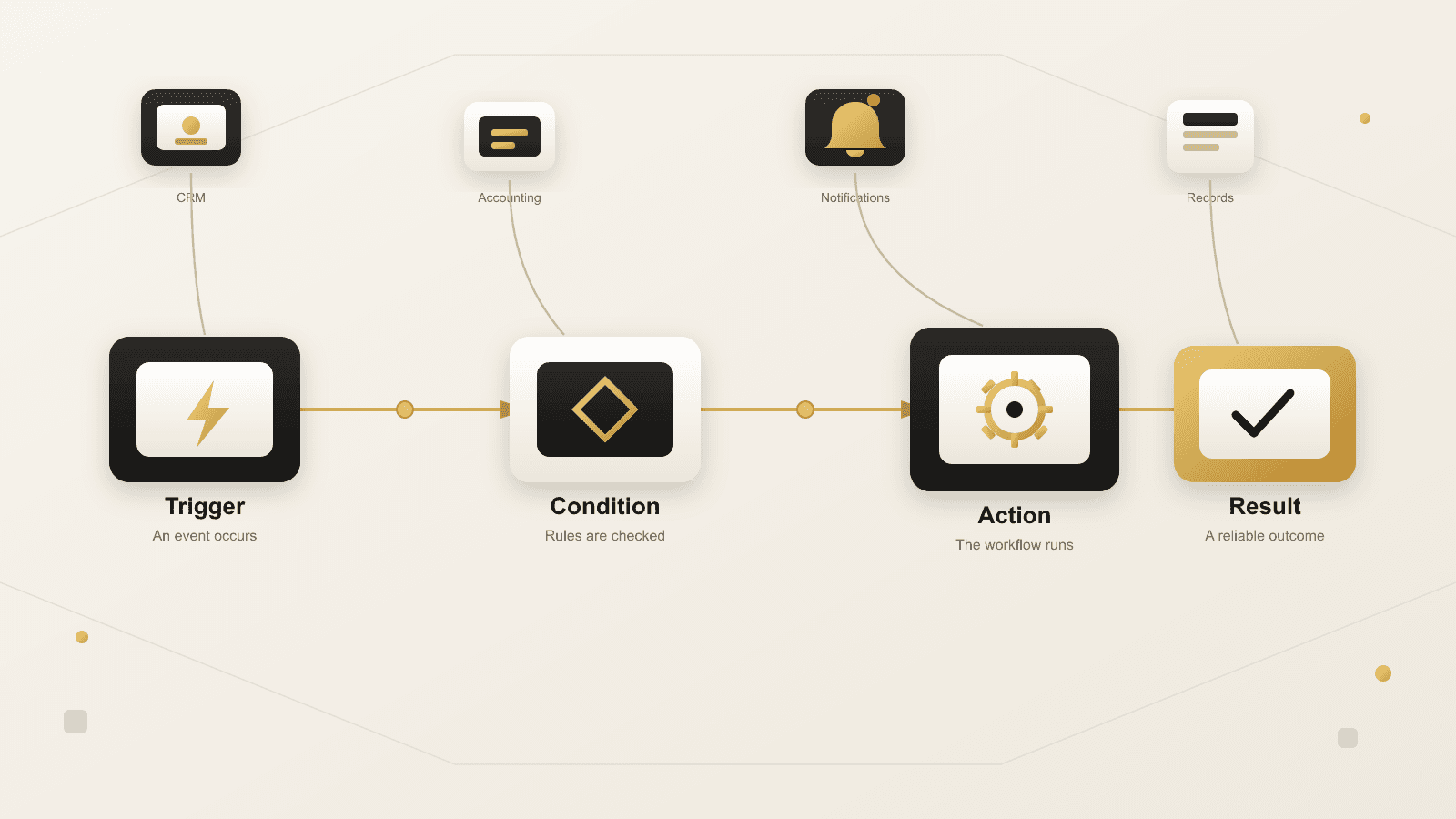
Most businesses do not lack tools. They lack a workflow that reliably connects the tools they already have. Workflow automation is the discipline of turning a repeatable business process into a defined sequence—a trigger, a set of conditions, an action, and a result—so the work happens the same way every time, without someone having to remember every step.
This guide explains what workflow automation actually is, how it works technically and operationally, where it differs from related ideas like RPA, AI agents, and API integration, more than twenty real-world examples across common departments, and a practical framework for deciding what to automate, what to leave alone, and how to choose the right approach for your organization.
What Is Workflow Automation?
Workflow automation is the use of software to carry out the steps of a business process automatically once a defined event occurs, based on rules the business sets in advance. Instead of a person manually checking, copying, notifying, or updating records at each step, the workflow performs those steps on its own and brings a person back in only where judgment, approval, or an exception is genuinely required.
A workflow, in this sense, is simply the path work takes from start to finish: a new order moves from received, to confirmed, to fulfilled, to invoiced. A new hire moves from offer accepted, to paperwork completed, to accounts provisioned, to first-day ready. Automation does not invent these workflows—it makes an existing one consistent, visible, and less dependent on someone remembering to act.
The term covers a wide range of scale. It can mean a single automated notification when a form is submitted, or it can mean a coordinated sequence spanning a CRM, an accounting platform, a document system, and a customer portal. What ties every example together is the same underlying structure, covered next.
Workflow automation is also not a single product category. It shows up as a feature inside a CRM or accounting platform, as a dedicated connector platform that links many apps together, and as custom logic built directly into a company’s own software. The right form depends on the workflow, not on whichever option is easiest to try first.
How Automated Workflows Actually Work
Nearly every automated workflow, regardless of the software behind it, is built from the same four parts. Understanding this structure makes it much easier to evaluate whether a process is a good automation candidate and to communicate requirements to a developer or consultant.
1. Trigger
The trigger is the event that starts the workflow: a form submission, a new row in a spreadsheet, a status change in a CRM, an incoming email, a webhook from another system, or a scheduled time (every night at 2 a.m., every Monday morning). A workflow can have exactly one trigger, though the trigger itself may originate from several possible sources.
2. Condition
The condition is the logic that decides what should happen next, and whether it should happen at all. Is the order value above a threshold that needs a manager’s approval? Is the customer a new contact or an existing one? Is required information missing? Conditions are what keep a workflow from blindly running the same action regardless of context.
3. Action
The action is the actual work the system performs: creating or updating a record, sending a notification, generating a document, moving a file, assigning a task, calling another system’s API, or posting a message to a team channel. Most real workflows chain several actions together in sequence.
4. Result
The result is the outcome a person or another system can rely on: a record that now exists, a person who has been notified, a status that has changed, or a task that has been created and assigned. A workflow is only useful if the result is dependable enough that people stop double-checking it manually.
A useful way to describe almost any workflow automation request, to yourself or to a development partner, is a single sentence built from these four parts: “When [trigger] happens, and [condition] is true, do [action], so that [result] occurs.” If you cannot fill in that sentence clearly, the process likely needs more definition before it is ready to automate.
Workflow Automation vs. Related Concepts
Workflow automation is often used loosely alongside several adjacent terms. Understanding the differences helps you ask for the right thing and avoid paying for more (or less) than the process actually needs.
Workflow Automation vs. Business Process Automation
These terms overlap heavily, and many people use them interchangeably. Workflow automation usually refers to automating one specific sequence of steps—an approval chain, a notification path, a data handoff. Business process automation is the broader discipline of examining and improving how an entire process runs end to end, of which workflow automation is often the implementation. In practice, a business process automation initiative is typically made up of several connected workflow automations working together. If you want a deeper look at identifying which processes deserve this treatment first, see what business processes you should automate first.
Workflow Automation vs. RPA (Robotic Process Automation)
RPA automates a process by simulating what a human does inside existing software—clicking buttons, typing into fields, reading a screen—typically because the underlying system has no usable API. Workflow automation, by contrast, usually connects systems through their APIs or built-in integrations, which tends to be faster to build and more reliable to maintain. RPA remains genuinely useful when a critical system is old, closed, or otherwise impossible to integrate with directly, but it should usually be considered after confirming that a proper integration is not available, since UI-driven automation breaks whenever the interface changes.
Workflow Automation vs. AI Agents
A traditional automated workflow follows rules a person defined in advance: the same input reliably produces the same output. An AI agent uses a language model to interpret unstructured input, make judgment calls, and decide what to do next—useful when the input varies too much for fixed rules, such as answering an open-ended customer question or summarizing an unpredictable document. The two are increasingly combined: a deterministic workflow handles the structured, predictable parts of a process, and an AI step is inserted only at the specific point where interpretation or judgment adds real value. Treating an AI agent as a default upgrade to every workflow, rather than a tool for a specific kind of uncertainty, is a common and costly mistake—more on this in the rule-based vs. AI-assisted comparison below.
Workflow Automation vs. API Integration
API integration is the technical connection that lets two systems exchange data—a CRM and an accounting platform agreeing on what a “customer” record looks like, for example. Workflow automation is the business logic layered on top of that connection: when this happens in one system, do this in the other, under these conditions. Integration without workflow logic just moves data; workflow automation decides what the data means and what should happen next. Most meaningful automation projects require both. See API integration explained and what API integration costs for more detail on the technical side.
Manual vs. Automated Workflows
The practical difference between a manual and an automated workflow is not speed alone—it is consistency, visibility, and where human attention is spent.
| Aspect | Manual Workflow | Automated Workflow |
|---|---|---|
| Consistency | Depends on the person handling it that day | Same steps run the same way every time |
| Speed | Limited by availability and attention | Runs as soon as the trigger occurs |
| Visibility | Status often lives in someone’s inbox or memory | Status is recorded and can be reported on |
| Error pattern | Typos, missed steps, forgotten follow-ups | Consistent unless the rule itself is wrong |
| Scalability | More volume requires more people | More volume runs through the same workflow |
| Where judgment is used | Spread across every step, including routine ones | Reserved for exceptions and real decisions |
The goal is not to remove people from the process. It is to stop spending human attention on steps that do not require a decision, so that attention is available for the steps that do.
Rule-Based Automation vs. AI-Assisted Automation
This is one of the most important decisions in a 2026 automation project, and also one of the most commonly rushed. AI is genuinely useful in the right place, but predictable, rules-based business processes generally do not need it just because it is available.
A deterministic, rule-based workflow is the right choice when the logic can be written down in advance and the same input should always produce the same output: routing an invoice over a fixed dollar amount to a specific approver, moving a paid order to “ready to ship,” or notifying a manager when a support ticket has been open longer than a set number of hours. These workflows are cheaper to build, easier to test, easier to audit, and fail in predictable ways.
An AI-assisted step earns its place when the input is unstructured or too variable for fixed rules to cover reasonably—classifying an open-ended support message, drafting a first response for a person to review, extracting key details from a freeform document, or summarizing a long conversation for a handoff. Even then, the safest pattern keeps a person reviewing the output before it affects a customer, a payment, or a record of authority, at least until the workflow has a track record.
A practical rule of thumb: if you can write the logic as a flowchart with a finite number of boxes and arrows, it does not need AI. If the input is closer to “read this and figure out what it means,” that is where an AI step—kept narrow and reviewed—is worth evaluating. Mixing the two well, rather than defaulting to either extreme, is usually where the most durable automation lives.
20+ Workflow Automation Examples by Department
These examples are illustrative patterns, not claims about specific NogaTech engagements. Use them as a starting point for identifying similar workflows in your own organization.
Sales Workflow Automation
Sales teams typically feel automation’s value first in how quickly a new lead reaches the right person and how visibly a stalled deal gets flagged.
- A new website inquiry automatically creates a CRM record, assigns an owner based on territory or product line, and notifies that person immediately.
- A deal that has not been updated in a set number of days automatically notifies the rep and their manager so it does not silently stall.
- A closed-won deal automatically triggers contract generation, a welcome sequence, and a handoff task for the account or delivery team.
Customer Service Automation
Support workflows benefit from routing and escalation logic that does not depend on a person happening to notice a request in time.
- An incoming support request is automatically categorized, routed to the right queue, and given a first-response deadline based on its priority.
- A ticket left without a reply past its service-level target automatically escalates to a supervisor instead of waiting to be noticed.
- A resolved ticket automatically triggers a satisfaction survey and logs the outcome against the customer’s account history.
Finance and Invoice Workflows
Finance workflows tend to combine clear rules with a genuine need for approval, making them a natural fit for rule-based automation with defined human checkpoints.
- An incoming vendor invoice is automatically matched against a purchase order and routed for approval only if the amounts do not align.
- An invoice above a defined threshold is automatically routed through a multi-step approval chain, with each approver’s decision logged.
- A paid invoice automatically updates the accounting system and closes the related purchase request without manual reconciliation.
HR and Onboarding Workflows
Onboarding and offboarding both involve several systems that need to move in lockstep on a specific date, which makes them well suited to automation.
- An accepted offer automatically triggers account provisioning, equipment requests, and a checklist assigned to the new hire’s manager.
- A completed onboarding form automatically populates payroll and benefits systems instead of requiring the same details to be typed twice.
- An employee’s last working day automatically triggers access revocation and equipment-return tasks across connected systems.
Operations Workflows
Day-to-day operations often run on recurring, schedule-driven tasks that are easy to forget manually but straightforward to automate.
- Inventory falling below a reorder threshold automatically notifies purchasing and, where appropriate, generates a draft purchase order.
- A completed field job automatically updates a scheduling system and triggers the next step, such as billing or a follow-up visit.
- A recurring maintenance checklist is automatically generated and assigned on a fixed schedule instead of relying on someone to remember.
Approval Workflows
Approval chains benefit most from automation when the routing rules and escalation path are clear, even if the final decision still requires judgment.
- A purchase request is automatically routed to the correct approver based on department and dollar amount, with automatic escalation if it goes unread.
- A contract requiring legal review is automatically routed to that team before it can move to signature.
Document Workflows
Document-heavy processes often lose time to filing, naming, and distribution rather than the document’s content itself.
- A signed contract is automatically filed in the correct folder, tagged with the client and date, and shared with the relevant team.
- A generated report or statement is automatically produced on a schedule and distributed to the right recipients.
Marketing Workflows
Marketing automation works best when it reacts to genuine engagement signals rather than sending the same sequence to every contact regardless of behavior.
- A downloaded resource automatically adds the contact to a relevant nurture sequence based on the topic they engaged with.
- A lead that reaches a defined engagement score is automatically flagged for sales follow-up instead of waiting for a manual review.
CRM Automation
A CRM is often the system every other workflow depends on, so keeping its records accurate is itself a high-value automation target.
- Duplicate contact records are automatically flagged or merged based on matching criteria, keeping the customer record trustworthy.
- A change in a customer’s account status automatically updates related records and notifies the account owner.
Email and Notification Workflows
Notifications are one of the simplest and highest-value automations because they replace “someone remembering to tell someone else” with a guaranteed message.
- A confirmation email is automatically sent the moment an order, booking, or request is submitted, without waiting for a person to be available.
- An internal alert is automatically sent when a defined threshold is crossed— a budget limit, an inventory level, or a service outage.
Scheduling Automation
Scheduling workflows reduce the back-and-forth of finding a time and the lost revenue that comes from avoidable no-shows.
- A booking request automatically checks availability, confirms the appointment, and sends calendar invitations to everyone involved.
- An upcoming appointment automatically triggers a reminder to reduce no-shows, with an easy path to reschedule.
Data Synchronization
When several systems each hold a partial version of the truth, synchronization keeps them close enough together that no team is working from stale information.
- A record updated in one system is automatically reflected in every other system that relies on it, instead of living as a separate, aging copy.
- Nightly synchronization reconciles records across systems and flags mismatches for review rather than letting them go unnoticed.
Workflow Automation Across Different Organizations
The categories above apply broadly, but the specific workflows worth automating differ by industry. Professional services firms often start with document collection, client status updates, and internal approvals. Healthcare and wellness organizations may focus on intake, referral, and follow-up workflows while keeping the appropriate privacy and review steps in place. Retail and e-commerce operations frequently automate order status, inventory alerts, and fulfillment handoffs. Hospitality businesses often look at inquiry routing, guest communication, and operational checklists. Government and community organizations commonly improve application tracking and constituent communication. In every case, the useful starting point is the same: find the workflow that creates the most friction today, not the workflow a vendor demonstrates most persuasively.
When Not to Automate
Automation is not automatically the right answer, and treating it as a default creates its own risks.
- The process itself is broken. Automating a workflow with unnecessary approvals, redundant fields, or steps nobody can explain just makes the waste happen faster and harder to see.
- The process changes constantly. If the steps, exceptions, or responsible people are different every time, the process needs clearer definition before it is ready to automate—not a workflow built around a moving target.
- The volume does not justify the investment. A process handled twice a year rarely needs the same investment as one handled hundreds of times a week.
- The decision genuinely requires human judgment. Sensitive personnel decisions, unusual exceptions, and situations with real ambiguity are usually better served by a person with good information than by a rule trying to anticipate every case.
- The systems involved are too unstable to integrate with. If an underlying system is being replaced soon, it may be more efficient to wait rather than build automation on a foundation that is about to change.
How to Identify Good Automation Candidates
Good automation candidates tend to share four traits: they happen often, the steps are reasonably well understood, an improvement will genuinely be noticed, and most exceptions can be anticipated in advance.
1. Frequency
How often does this happen—daily, weekly, hundreds of times a month? A modest improvement to a frequent process usually creates more value than an ambitious change to a rare one.
2. Rule clarity
Can the decision points be written down without “it depends” for every case? A workflow with clear, statable rules is ready for deterministic automation. One that cannot be described consistently needs more definition first, or a narrow AI-assisted step for the genuinely ambiguous part.
3. Human-in-the-loop points
Identify exactly where a person should stay involved—approving a payment, reviewing an AI-drafted response, handling a flagged exception—and design the workflow to bring the right person in at that specific point, rather than removing all review or requiring it everywhere.
4. Data and system readiness
Do the systems involved have an API, webhook, or supported integration path? Is the underlying data clean enough to trust? A workflow can only be as reliable as the data and connections it depends on.
Human-in-the-Loop Workflows
Not every step in a workflow should run without a person seeing it first. A human-in-the-loop workflow deliberately pauses at a specific point—an approval, a review, a confirmation—before an automated action takes effect, rather than treating every step as equally safe to run unattended.
This matters most in three situations: when an action moves money or commits the organization to a cost, when it communicates with a customer in a way that is hard to walk back, and when the input came from an AI-assisted step that interpreted something rather than matched it against a fixed rule. In each case, the workflow can still do most of the work automatically—gathering information, preparing the record, drafting the message—while leaving the final decision to a person who can see the full context in one place.
Designing the review step well matters as much as designing the automation itself. A reviewer who has to dig through several systems to evaluate a request will eventually approve things without really checking, which defeats the purpose. A good human-in-the-loop step surfaces exactly the information needed to make the decision, in one place, with a clear default for what happens if nobody responds in time.
APIs, Webhooks, Queues, and Integrations
Underneath every workflow automation is a technical layer that moves data between systems. Understanding the basic vocabulary helps you evaluate proposals and ask better questions, even without a technical background.
APIs and Webhooks
An API lets one system request information or trigger an action in another on demand—“get this customer’s order history,” “create this invoice.” A webhook works the opposite way: instead of asking repeatedly whether something has changed, the source system sends a notification the moment it happens, which is usually the more efficient way to trigger a workflow than checking on a fixed schedule.
Data Mapping Between Systems
Two systems rarely describe the same thing the same way. One platform’s “customer” might combine what another system splits into separate “account” and “contact” records, and a status field like “open” in one tool may not mean the same thing as “open” in another. Data mapping is the work of defining exactly how each field and status in one system corresponds to the other, and it is frequently where a project’s real complexity lives, even when the workflow logic itself looks simple on paper.
Queues and Asynchronous Processing
For higher-volume or longer-running workflows, actions are often placed in a queue and processed in the background rather than handled instantly and synchronously. This keeps the triggering system responsive and makes it possible to retry a failed step without losing the original request.
Error Handling and Retries
Systems go down, networks time out, and data occasionally arrives malformed. A dependable workflow anticipates this: it retries transient failures on a sensible schedule, routes anything it cannot resolve to a person instead of silently dropping it, and records enough detail to diagnose what happened. Automation that fails silently is often worse than no automation at all, because nobody realizes the work stopped happening.
Workflow Monitoring
Once a workflow is running, someone needs a way to see whether it is actually working: how many times it has run, how many failed, and where. Basic monitoring and alerting—even a simple daily summary—turns automation from a black box into something the business can trust and improve over time.
Security and Permissions
An automated workflow often needs credentials to act on your behalf across several systems, which makes access control and secrets handling a real security consideration, not an afterthought. Good practice includes granting each connection only the permissions it actually needs, storing credentials securely rather than embedded in scripts or shared documents, logging who approved sensitive actions, and reviewing access periodically as systems and staff change. Following established secure-development guidance for how credentials and authorization are handled matters more, not less, as more of the business runs through automated systems.
This is also where role separation matters: the person who can approve a workflow change should not always be the same person who can quietly disable its monitoring. As automation takes on more sensitive actions—payments, access changes, customer communication—the access controls around it deserve the same scrutiny as the access controls around the underlying systems themselves, not less.
Choosing Workflow Automation Software
Software choice should follow from the workflow you mapped, not the other way around. The comparisons below assume you already know which processes you want to automate and are deciding how to build them.
No-Code / Low-Code Platforms vs. Custom Development
Connector-based, no-code and low-code platforms are strong for common, well-understood integrations between popular business tools, and they let non-developers build and adjust simple workflows quickly. They tend to become limiting when a workflow needs custom logic the platform does not support, needs to run at a volume or speed the platform is not built for, needs to connect to a system without an existing connector, or needs the kind of error handling, security, and monitoring a business-critical process requires. Custom-built automation costs more up front but removes platform limits and can be shaped exactly around the workflow.
Platform-Style Tools vs. Custom Automation
Zapier-, Power Automate-, and Make-style platforms are a reasonable starting point for straightforward, moderate-volume workflows between well-supported apps, and they are worth trying before committing to custom development. Custom automation tends to be the better investment once a workflow is business-critical, involves complex or branching logic, needs to connect to an internal or legacy system without a ready-made connector, or needs to scale well beyond what a per-task pricing model can support economically. Many organizations use both: connector platforms for simple, low-risk workflows, and custom development for the processes that matter most.
| Factor | Connector Platforms | Custom Development |
|---|---|---|
| Setup speed | Fast for supported apps | Slower; requires design and development |
| Cost model | Subscription, often per task or run | Project investment, then ongoing maintenance |
| Logic complexity | Best for simple, mostly linear workflows | Supports complex branching and custom rules |
| System coverage | Limited to available connectors | Can connect to any system with an API |
| Scale and volume | Can become costly at high volume | Built to fit the actual volume and load |
| Ownership | Dependent on the platform’s roadmap | Fully owned and controlled by the business |
Cost Factors
What a workflow automation project costs depends less on the number of steps and more on the number of systems it touches, the quality and consistency of the underlying data, how much branching logic and exception handling the process genuinely needs, whether existing systems already expose a usable API, and how much monitoring, security review, and ongoing maintenance the workflow requires once it is live. A guide focused specifically on this question is available at API integration cost.
Implementation Process
1. Map the current workflow
Document the trigger, the people involved, the systems touched, the decisions made, and the exceptions that come up—before proposing a solution.
2. Define success
Agree on what should measurably improve: faster turnaround, fewer errors, better visibility, or less manual effort, so the result can later be evaluated against something concrete.
3. Design the trigger–condition–action logic
Translate the mapped workflow into explicit rules, including what happens in every exception path you identified, not just the common case.
4. Build and connect the systems
Implement the integrations, whether through a connector platform or custom development, with appropriate error handling, logging, and permissions from the start.
5. Test real scenarios, including failures
Test the common path, the edge cases, and what happens when a step fails or a system is temporarily unavailable—not only the ideal scenario.
6. Launch with monitoring in place
Roll out with a way to see whether the workflow is actually running correctly, and a clear path for someone to intervene if it is not.
7. Review and adjust
Revisit the workflow after it has been running for a while. Processes, systems, and volume change, and a workflow that fit the business a year ago may need adjustment.
These seven steps apply whether the workflow is built on a no-code platform in an afternoon or as part of a larger custom system over several months. The scale changes; the sequence of mapping, defining success, designing logic, building, testing, launching, and reviewing does not.
Common Automation Mistakes
Automating Before Simplifying
Automating an unnecessary approval or a redundant step only makes that waste happen faster and harder to question later.
Choosing a Tool Before Understanding the Problem
A platform demo can make almost any workflow look effortless. The real work is understanding what happens today, where it breaks down, and what a better outcome actually looks like.
Ignoring Exception Paths
Workflows built only for the happy path tend to fail quietly the first time something unusual happens, leaving no clear owner for the exception.
Adding AI Where Rules Would Do
Using an AI step for a decision that could be written as a simple rule adds cost, unpredictability, and review overhead without a corresponding benefit.
Treating Launch as the Finish Line
A workflow with no owner, no monitoring, and no maintenance plan tends to quietly drift out of date as the business, systems, and volume change around it.
Skipping Data Mapping
Assuming two systems mean the same thing by “status,” “customer,” or “complete” is one of the most common sources of a workflow that runs but quietly produces wrong results, rather than failing loudly enough to be noticed.
No Plan for What Happens When It Fails
Every workflow will eventually hit a scenario it was not designed for. Without a defined fallback—a notification, a queue for manual review, a clear owner—that scenario tends to disappear silently instead of getting handled.
Measuring Workflow Automation ROI
Rather than relying on generic industry statistics, measure what the workflow itself was meant to change. Compare a defined “before” period against the same period after the workflow has been running, using metrics specific to that process:
- Turnaround time from trigger to completion.
- Error or rework rate on the affected records.
- Volume of manual, repetitive work removed from the team.
- Number of items that fell through the cracks before vs. after.
- Time spent by a person handling exceptions rather than routine steps.
As an illustration, consider an invoice approval workflow. Before automation, a team might track how many invoices sat waiting for approval past a week, how often the wrong approver was contacted first, and how much staff time went into following up on status. After the workflow is live, the same three measurements are tracked again over an equivalent period. The comparison—not an assumed industry average—is what tells you whether the automation actually worked for this specific process.
These numbers will look different for every organization, which is exactly the point: a workflow’s value should be judged against its own baseline, not against a percentage claimed by a vendor.
Workflow Automation Readiness Checklist
Twenty questions to work through before starting a workflow automation project:
- What specific process are we trying to improve?
- How often does this process happen?
- Who is currently responsible for each step?
- What triggers the process today?
- What decisions or conditions determine what happens next?
- Can those decisions be written down as clear rules?
- Which parts of the process genuinely require human judgment?
- Which systems are involved, and do they have an API or webhook support?
- How clean and consistent is the data those systems hold?
- What happens today when something goes wrong or falls outside the norm?
- What should happen when the automated version encounters an exception?
- Who should be notified if the workflow fails?
- What does success look like, in measurable terms?
- What is the cost of the current manual process, in time or errors?
- Is a no-code platform sufficient, or does this need custom development?
- What security and access controls does this workflow require?
- Who will own this workflow after it launches?
- How will we monitor whether it is actually working?
- How often should this workflow be reviewed and adjusted?
- What is the plan if the underlying systems change in the future?
How NogaTech Approaches Workflow Automation
NogaTech starts every automation project with the workflow itself: the trigger, the people, the systems, the exceptions, and the outcome that actually matters. From there, we design the trigger–condition–action logic, connect the right systems through APIs and integrations, build in error handling and monitoring from the start, and apply AI only where the process genuinely benefits from it. Explore our automation and connected systems service to see how these projects are approached, or read more about identifying the right processes to automate first and 20 more business process automation examples.
Frequently Asked Questions
What is workflow automation in simple terms?
Workflow automation is using software to carry out the steps of a business process automatically once a defined event occurs, so a person does not have to manually perform each routine step.
Is workflow automation the same as RPA?
No. RPA simulates a person clicking through existing software, usually because no API is available. Workflow automation typically connects systems directly through APIs or integrations, which is generally more reliable.
Do I need AI for workflow automation?
Not usually. Predictable, rules-based processes are typically better served by deterministic logic. AI earns its place specifically where input is unstructured or too variable for fixed rules to handle well.
What is the difference between workflow automation and business process automation?
Workflow automation typically refers to automating one specific sequence of steps. Business process automation is the broader effort of improving an entire process end to end, often made up of several connected workflow automations.
How much does workflow automation cost?
It depends mainly on how many systems are involved, how complex the branching logic is, whether existing systems expose a usable API, and how much monitoring and maintenance the workflow requires—not on the number of steps alone.
Ready to Automate a Real Workflow?
Start with one process your team handles today and the friction it creates. A conversation about the trigger, the systems involved, and the outcome you want can reveal whether a simple connector, a custom workflow, or a broader system is the right next step.
Tell Us About Your ProjectYou can also view our work to see the types of business systems and connected workflows NogaTech supports.